Hello! I’m Sarvesh, working in Financial Accounting and Auditing Sector. While doing my internship as a CA Article, I came to know about the importance of this wonderful software MS Excel. What I have learned is just a drop from the sea of excel. This is a lifelong learning journey and I’m on it.
I have seen two types of people, based on their use of excel, first are those who use excel just as data storing and format preparing software, and the second are those who put excel to do their work. Currently, you may belong to whatever type, trust me, there’s a lot to learn. If you are one of those from First Type, I’ll help you in being smart and putting excel to do your work rather than just storing your data and formats. I think this is enough to create an expectation in your mind about what we’re going to learn.
First things first, I want you to consider your Job (you can be an Accountant, Teacher, Tax Practitioner, Chartered Accountant, Certified Public Accountant, or a Student, Intern) and think and imagine about “What I want excel to do for me??” Get ready with a clear image in your mind about your objective of coming here to learn excel.
Since this is day one, let’s start from one easy and essential part:
The Version of Excel/Microsoft Office:
I want you all to observe is your version of Excel or Microsoft Office.
You can check in your ‘Start Menu’ where it shows “Microsoft Excel 2013 or Microsoft Office 2013, 2010”.
Though plenty of features are similar in all versions, obviously Microsoft adds new features with new versions. I’ll be writing about features that are common in all versions.
(Tell me in the comments which version of Excel you are using.)
Workbooks and Worksheets:
These are the terms we will be using frequently in the future so I want you to have a clear understanding of them. The Workbook is an excel file containing worksheets. Consider Workbook as a Book and Worksheet as a Sheet of paper in it. The number of worksheets you can have in a single workbook depends on available memory. Practically speaking you can add as many worksheets as you need.
Rows, Columns & Cells:
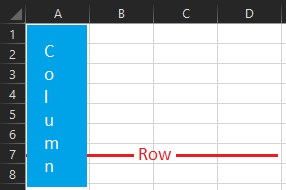
This is the area that I found confusing as I was learning excel. Columns are vertical and Rows are horizontal. In the image below, ‘A’ is Column and ‘1’ is Row. The intersection of Row and Column is a Cell. To refer to the specific cell, the Cell address is used. The cell address is “Column & Row”. So one can say,” Refer Cell B2.” and we have to go for Row ‘2’ in Column ‘B’.
Now some facts about excel:
- The Excel software was first launched in 1985 and it was initially Mac-only software.
- Excel has 10,48,576 Rows and 16,384 columns. So it has 10,48,576 X 16,384= 17,17,98,69,184 Cells. Yes, You read it right there is no typo.
- Excel Workbook size is limited only by available memory. But let me tell you one thing, the more size, the more time it takes to open and update.
So here ends my first introduction blog, stay tuned for the next blog “Basic Functions”.
Please tell me How it was in the comments down below.
A learn some basic details of Excel 2013, I’d love to learn more.
Thank you for educating me.
More articles on excel and tax are coming boss… Thank you for your time